
Without a network, a field tool must keep letting people do what cannot wait: read a critical procedure, tick off a checklist, log a reading that will be sent later, once, with the real time of the check. Everything else can stop, including the assistant and voice, on one condition: the team knows before the outage. And when the device itself will not open, there is paper, prepared in advance.
Saturday, 11:05 am, in the cellar
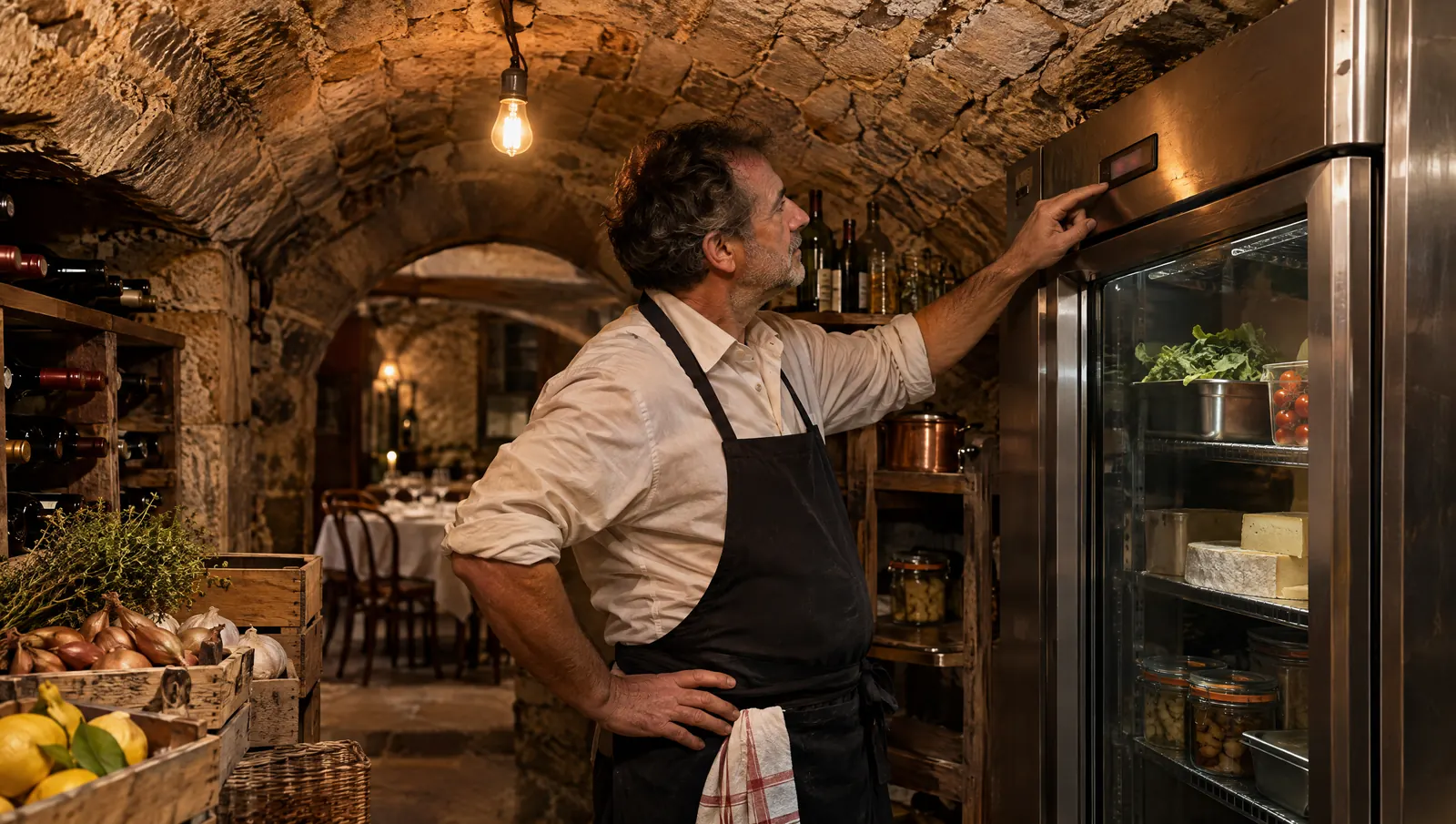
Loïc runs a country inn at the end of a back road. Phones get two bars in the dining room, one by the pass, none in the vaulted cellar where the cheese fridge and the drinks store live. On this Saturday, the broadband router has also been down since opening. The engineer can come on Monday.
Sakina goes down for the 11 am reading. She reads the temperature and enters it on the shared tablet. The screen spins. She has no idea whether it saved. She goes back up and asks Loïc. Loïc does not know either. To be safe, she goes back down and writes the reading in marker on a cardboard wine case.
At 3 pm the connection returns. There may be two 11 am readings, or none, and a cardboard box headed for recycling. Nothing went wrong in the fridge. But nobody can prove it. (Fictional scene and characters.)
Why the signal always drops in the wrong place
The walls that keep the cold in also keep the signal out
A walk-in cooler is an insulated box, often in a basement, behind a thick door. A vaulted cellar has stone walls. These are exactly the places where the most important readings are taken, and exactly where phones lose signal.
Rural, mountain and seaside sites
Plenty of businesses live with weak mobile coverage: a village pub, a mountain lodge, a beach kiosk. A tool that assumes a perfect connection was not designed for them.
The router that dies on a Saturday
Even in town, routers fail, roadworks cut a cable, a storm knocks everything out. It rarely happens on a quiet Tuesday afternoon. It happens on a Saturday at opening, with no engineer until Monday.
The real risk is doubt
The worst part of an outage is not knowing what still works. Sakina does not know whether her entry exists. So she enters it twice, or guesses, or writes on a box. Uncertainty produces duplicates, gaps and records nobody can find.
What must keep working without a network
During an outage, a good field tool should guarantee six things. Use them to judge your own.
- Critical procedures stay readable. What to do when a fridge fails, allergens, cleaning a dangerous machine, first steps for a burn: these are the sheets people look for precisely when something has gone wrong.
- Checklists can be ticked. Opening and closing do not wait for the router.
- Readings can be entered and are kept on the device. The 11 am temperature is stored with the time of the check, not the time it is eventually sent.
- When the network returns, everything goes up once. No duplicate if someone tapped twice, no lost reading if the device was switched off in between.
- The tool says where it stands. A visible "offline" label, and a list of what is waiting to be sent, so Sakina does not have to climb the stairs to ask.
- The person stays identified. A reading entered offline keeps the name of whoever took it, like any other.
Point 5 is the one most often missed. It is also the one that saves the cardboard box: when the screen says "1 reading waiting to send", nobody starts again.
What can stop, as long as it says so
Some functions can stop during an outage, and it is better to admit it.
The assistant and voice
An assistant that answers plain-language questions needs the network, on screen and by voice. That is true of Tsuno San, and we would rather say it than leave you to find out. What matters is how it stops: it should say clearly that it cannot answer, and never give an approximate answer instead. A procedure recited from memory on a critical topic is worse than no answer at all (see why an assistant must be able to say I don't know).
Comparison views and notifications
Group figures, site comparisons, team messages: all of that can wait a few hours. An alert that goes out late is still a problem to plan for, which is why someone needs to check readings by eye during the outage.
Anything that lands on someone else's desk
A purchase order to a supplier, a holiday request, a published rota: these affect other people. Better that they wait for the network and go out while the person who started them can see it happen.
The grid: what continues, what waits, the backup
| Function | Without a network, a good tool… | Can wait for the network | Backup if the device will not open |
|---|---|---|---|
| Temperature reading | Keeps the entry and its time, sends it once | Sharing with managers | Blank log sheet per unit |
| Opening or closing checklist | Lets you tick, keeps the record | Site roll-up | Printed checklist, signed |
| Critical procedure (cold chain, allergens, cleaning) | Keeps it readable | Updates | Printed copy, dated, with version |
| Question to the assistant | Says it cannot answer | The whole conversation | The manager on duty, the paper sheet |
| Voice | Stops and says so | Everything | The screen, then paper |
| Supplier order, rota | Waits, without losing the draft | Sending | Phone the supplier if urgent |
| Site comparison | Nothing | Everything | Nothing: it is not urgent |
How to tell the team clearly
You do not manage an outage on the spot. You prepare for it on a quiet day, in half an hour.
- Write a five-line notice, no more. For example: "No network? The assistant will not answer. Do readings and checklists in the app, they will send themselves. If the app will not open: red binder, office shelf. Tell the manager."
- Post it by the tablet and at the door of the walk-in.
- Show it to every new starter on day one, alongside the opening checklist.
- Run a test. Unplug the router on a Tuesday after service, take three readings, plug it back in, and see what arrived.
- Name one person per shift who decides to switch to paper. Without that person, everyone decides alone, and half the team writes on paper while the other half types.
A paper backup without double entry forever
Backup paper has a bad reputation, and rightly so: when it stays "just in case", it becomes the rule and everything is entered twice. It still has a place, if you keep it short.
- One blank log sheet per unit, with columns for date, time, temperature and name.
- The four or five critical procedures printed, with their date and version. A two-year-old printout is dangerous: it states with confidence something that is no longer true. We cover this in an outdated procedure is more dangerous than a missing one.
- A copy-in rule: who enters the sheet, when, and what happens to it afterwards (it is dated and kept, not thrown away).
- A check whenever a critical procedure changes: the printed copy is replaced the same day.
Paper is only for when the device will not open. If the app works offline, use the app, and the sheet stays in the binder.
Common mistakes
- Finding out how the tool behaves on the day of the outage. Test it cold, before you need it.
- Assuming the assistant "will cope". Without a network, it does not answer. The team needs to know.
- Keeping printed procedures with no date. Nobody can tell whether they are still right.
- Letting everyone decide alone to go to paper. You end up with two sources for the same reading.
- Copying paper in "later" without saying who. Later becomes never.
What to measure
- After an outage: readings expected, readings received, duplicates. All three should add up.
- On test day, how long it takes a staff member to know whether their entry has saved.
- The age of the oldest printed procedure in the backup binder.
What Tsuno does today, and what it does not
- In the Tsuno app, entries made offline are sent once the connection is back.
- The app installs on phones and tablets with no app store needed. The site tablet has a shared mode: each person uses their own code, and it only sees its own site.
- Temperature readings are logged per unit, with thresholds. A reading outside the threshold alerts the site's managers.
- Procedures and files are organised by site, and your data can be exported as CSV and PDF.
What Tsuno does not do: San, the smart voice assistant, needs the network. Without a connection it does not answer, on screen or by voice (its statuses are set out in where San stands). Keeping critical procedures and checklists available during an outage is what a good tool should do, and it is something we are working on. During a trial, check for yourself what is shown offline and that a resent reading appears only once: that is exactly what the grid above asks you to test.
The full feature list is on the Features page, and the assistant on the Tsuno San page.
Further reading
The readings taken where there is no signal are often the ones taken with full hands too: see HACCP checks with busy hands: no more greasy pen and why temperature checks can be completed and still be useless. For the list of things the assistant refuses to do, read what San never does. And for places where voice is the wrong answer even with a signal, kitchen noise and why voice is not always the answer.
Key takeaway
Without a network, readings, checklists and critical procedures must carry on; the assistant and voice can stop, as long as they say so. Prepare for the outage on a quiet day: a posted notice, a test run, a dated backup binder.
Frequently asked questions
What should restaurant software do when the internet goes down?
It should let staff carry on with the tasks that cannot wait: logging a temperature, ticking off a checklist, reading a critical procedure. Entries are kept on the device and sent once when the network returns, with the real time of the check.
Does a voice assistant work without an internet connection?
Not Tsuno San. The assistant, on screen or by voice, needs the network to answer. When there is none, it should say so clearly, and the team uses the app or the paper backup instead.
Are temperature logs entered offline in Tsuno lost?
No. In the Tsuno app, entries made offline are sent once the connection is back. This applies to entries made in the app, not to the San assistant.
Should we keep paper sheets as a backup?
Yes, a small supply: one blank log sheet per unit and the critical procedures printed, dated, with their version number. Paper is for when the device itself will not open, and you need to decide in advance who copies it in and when.
How do we tell the team the assistant has stopped answering?
With a short notice posted by the tablet, written before any outage: what still works, what does not, where the backup binder is. The tool itself should show that it is offline and what is waiting to be sent.
Keep reading
AI and tools
HACCP software, scheduling tool, assistant: where does each one stop?
POS, scheduling and payroll, HACCP, training, messaging, assistant: each tool has a boundary. Knowing it avoids double entry and misplaced expectations.
AI and tools
Why a general AI does not know your restaurant
A general AI knows what HACCP is, not that your cooler 2 read 6 °C last night. To talk about your place, it has to be connected to your dated facts.
AI and tools
12 questions to ask before connecting an AI to your business
Rights, confirmation, logs, data sent out, exclusions, leavers: 12 questions to ask a vendor before connecting your AI, and the answers to demand.